3 min read
How Automated Direct Mail Gift Processing Works for Nonprofits
Stefan Karnyaczki
:
September 10, 2026
Table of Contents
Automated direct mail gift processing connects returned mail, payment information, campaign coding and supporting documents with the correct constituent and gift records in Raiser’s Edge NXT. Instead of asking staff to re-enter every response manually, the process transfers structured information from a lockbox or caging provider into the CRM, applies defined business rules and identifies transactions that require human validation.
This is especially valuable during annual and year-end campaigns, when response volumes increase and delays can affect acknowledgements, reporting and the donor experience.
Why automate direct mail gift processing?
Direct mail processing involves more than entering a gift amount. Teams may need to identify the constituent, apply the correct appeal and package, record the payment method, preserve supporting documents and flag unusual responses for review.
When these steps depend on manual entry, spreadsheets and disconnected handoffs, processing slows down and the risk of inconsistent campaign coding increases. Automation creates a repeatable workflow while keeping people involved where review or judgment is required.

1. Prepare segments, appeals and packages
The process begins before the mailing is produced. The nonprofit defines its audiences and determines which appeal and package each constituent should receive. Giving history, recency, frequency, program interest, previous mail response and suppression rules may all influence those decisions.
AmpliPhi.app helps fundraising and data teams build, validate and apply donor segments from one workspace. Teams can organize segments in a defined priority, review audience counts and push campaign assignments back to the CRM. This allows the appeal and package information to be associated with each constituent before the mailing is sent.
For a deeper explanation of campaign audience design, see SimpliPhi’s guide to annual giving segmentation.
2. Receive and process returned gifts
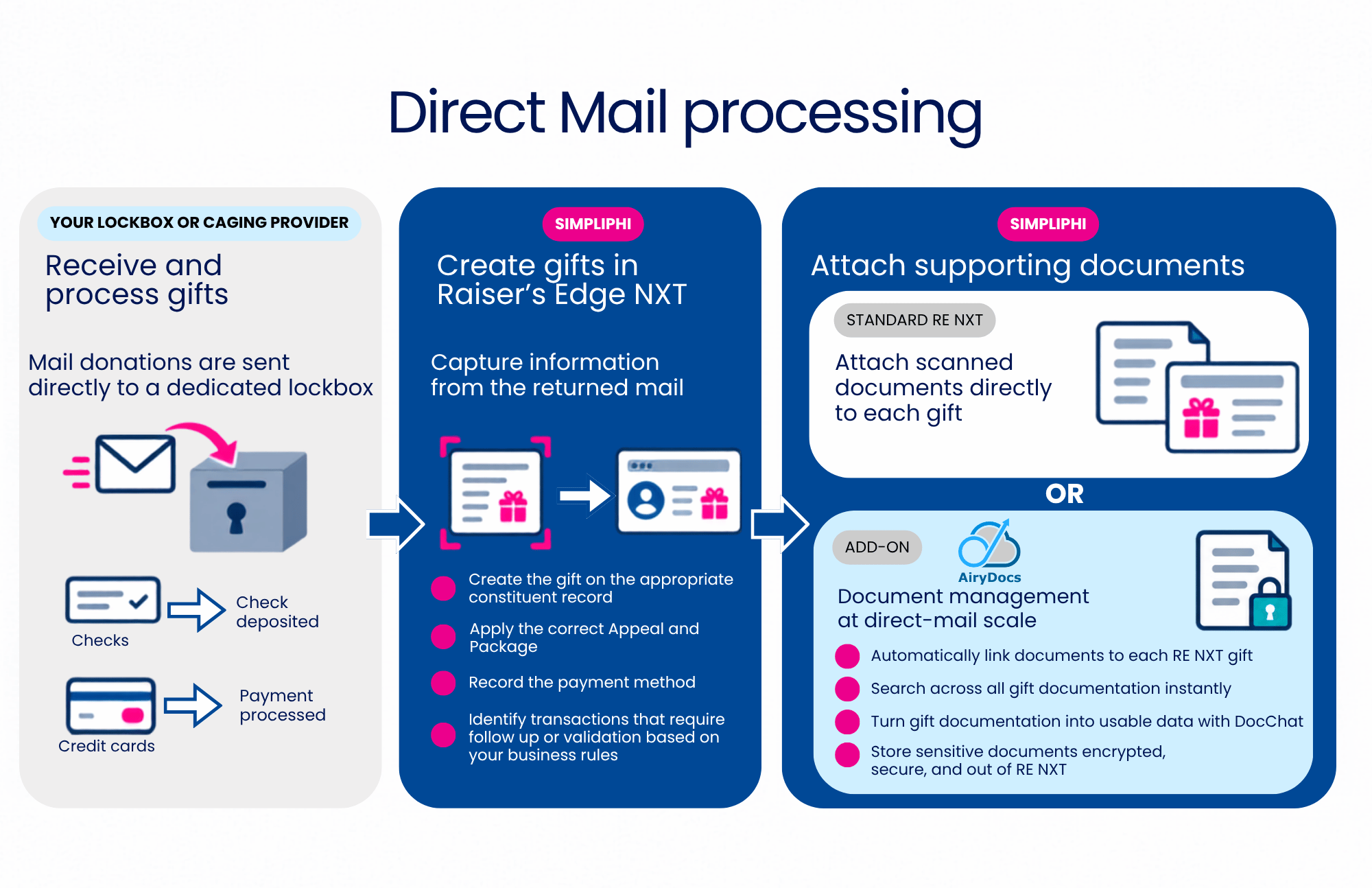
Donors return reply forms with checks or credit card information to the nonprofit’s designated address. A lockbox receives the mail, opens and scans the documents, and processes the payments according to the organization’s established banking workflow.
SimpliPhi can connect its technology with the organization’s existing lockbox or caging provider. Checks are deposited and credit card payments are processed through the provider’s financial workflow, while the corresponding transaction data is prepared for gift creation.
3. Create gifts in Raiser’s Edge NXT
SimpliPhi’s technology captures information from the returned mail and uses it to create the gift on the appropriate constituent record in Raiser’s Edge NXT. For house-file mailings, the response information can identify the existing constituent and the campaign assignment prepared before launch.
The automated workflow can:
- Create the gift on the appropriate constituent record
- Apply the correct appeal and package
- Record the payment method and relevant transaction details
- Apply the nonprofit’s established coding and validation rules
This gives the CRM a consistent campaign history and reduces repetitive gift-entry work during high-volume periods.
4. Validate exceptions and follow-up items
Automation does not mean every item is processed without oversight. SimpliPhi identifies transactions that require human validation based on the nonprofit’s business rules.
A returned envelope may contain an incomplete payment, a reply form without a donation, a letter requiring staff attention or information that should update the constituent record. These items can be separated for review instead of being incorrectly created as gifts.
This approach focuses staff time on the responses that require a decision while allowing standard transactions to move through the defined workflow.
5. Attach and manage supporting documents
Scanned reply forms, checks and other supporting materials can be linked to the corresponding gift. With standard Raiser’s Edge NXT functionality, they can be stored as gift attachments.
Organizations that need more advanced document management can use AiryDocs for Blackbaud Raiser’s Edge. AiryDocs provides secure, integrated document management that keeps supporting files connected to the relevant Raiser’s Edge NXT gift while making them easier for authorized staff to access and manage.
Use campaign results to improve future segmentation
Once responses are recorded consistently, the nonprofit can see which donor segment received each appeal and package, how the donor responded and which documents support the transaction. That history gives fundraising and data teams better information for evaluating campaign performance and planning the next audience strategy.
The result is a connected cycle: segmentation prepares the campaign, automated processing records the response and the resulting data improves future segmentation.
Prepare for your next direct mail campaign
Automating direct mail gift processing can reduce repetitive entry, improve campaign coding and give staff more time to focus on donor relationships and fundraising priorities.
Request a direct mail processing consultation to discuss your current lockbox, gift-entry and Raiser’s Edge NXT workflow.
Frequently asked questions
What is a lockbox or caging provider?
A lockbox or caging provider receives returned donor mail, scans the documents and processes checks or credit card payments for the nonprofit. SimpliPhi’s technology can connect with the organization’s existing provider to move the corresponding gift data into Raiser’s Edge NXT.
Does SimpliPhi process the payments?
The lockbox or caging provider handles the financial workflow. SimpliPhi automates the related CRM workflow, including constituent matching, gift creation, campaign coding and validation rules.
Can the process handle exceptions?
Yes. Transactions that do not meet the nonprofit’s business rules can be identified for human validation or follow-up rather than being processed automatically as standard gifts.
Where are the supporting documents stored?
Documents can be stored as standard Raiser’s Edge NXT gift attachments or managed through an integrated document management solution such as AiryDocs.