6 min read
How Hospital Foundations Can Automate Donor Data Workflows
The Automation Gap in Nonprofits Every day, hospital foundation teams balance urgent donor requests, campaign deadlines, and compliance requirements...
Official Partner
We believe powerful tools shouldn't be complicated. SimpliPhi helps organizations work smarter, move faster, and drive real impact—simplifying the hard stuff so you can focus on what you do best.
Nonprofit workflow automation uses technology and predefined rules to complete repetitive tasks, move data between systems, and route exceptions to the right person for review.
In fundraising operations, this can include collecting gifts and event registrations, matching constituent records, applying campaign codes, moving transactions into a CRM, supporting reconciliation, updating reports, and triggering acknowledgements.
The purpose is to keep reliable, repeatable work moving while giving your team control over unusual, incomplete, or higher-risk transactions.
Nonprofit fundraising teams manage a constant flow of gifts, event registrations, constituent updates, campaign codes, reports, and acknowledgements. When these processes rely on spreadsheets, manual imports, and repeated data entry, even a small increase in volume can create delays, errors, and pressure across the organization.
This guide will help you identify which fundraising workflows are ready for automation, which decisions should remain with your team, and how to evaluate a process before investing in new technology. You will also find practical nonprofit automation examples, a workflow-assessment framework, and a simple way to calculate the cost of manual work.
A nonprofit should consider automating a workflow when the same steps happen frequently, involve a high volume of records, and follow stable, documented rules. Processes that require repetitive data entry or regular movement of information between systems are often strong candidates, especially when manual work delays gift processing, acknowledgements, campaign launches, reconciliation, or reporting.
Before automating, your team should also understand the exceptions. Routine transactions can follow the automated path, while incomplete records, unusual gifts, or uncertain constituent matches can be sent to a staff member for review.
A workflow is ready for automation when it can be monitored, tested, and corrected if something goes wrong. The goal is to automate predictable work while giving your team clear control over exceptions and higher-risk decisions.
Before choosing an automation tool, assess the workflow itself. A technically possible automation may still produce unreliable results when the process, rules, or responsibilities are unclear.
Use these six questions to evaluate whether a fundraising workflow is ready.
| Factor | Question to ask |
|---|---|
| Volume | How many transactions, records, or files does the team process each week or month? |
| Repetition | How often does the team repeat the same steps? |
| Rules | Can the team clearly explain and document how each transaction should be handled? |
| Exceptions | Which situations should leave the automated workflow and go to a person for review? |
| Risk | What could happen if a record is matched, coded, updated, or acknowledged incorrectly? |
| Timing | Does the manual process delay gift entry, acknowledgements, campaigns, reconciliation, or reporting? |
Use our practical workflow automation checklist to evaluate volume, repetition, rules, exceptions, risk, and timing before deciding what to automate. Download the Nonprofit Workflow Automation Checklist
Many nonprofit teams spend hours each week doing the same things: exporting reports, uploading CSV files, copying and pasting donor records, or reconciling data between systems. These tasks are not just time-consuming. They are also error-prone and mentally draining.
If you are seeing these types of repetitive activities happen on a regular basis, it is a strong signal that workflow automation could save your team time and effort.
Automation becomes more valuable as volume increases.
If your organization processes thousands of gift transactions, online donations, or event registrations each year, you have likely outgrown the manual processes that once worked when your volume was lower.
You do not need to wait for the data to feel unmanageable. If your team is already stretched during campaign season or year-end, that is a clear sign that automation could help you manage high volumes more smoothly.
Automation works best when it is applied to workflows that are already structured and familiar. That means you and your team know the steps involved, understand the potential exceptions, and can describe how data moves from start to finish.
If your workflow is still evolving, or only one person knows how it works, focus first on documenting and standardizing it. Once that is done, automation can help scale it.
Not every part of a process should be automated, and that is a good thing. The best workflows combine automation with smart human oversight.
For example, if a donation comes with a handwritten note or a unique comment, it is often better to route it to a staff member rather than try to automate the response. By identifying which parts of a process are straightforward and which ones need a human touch, you can automate with confidence while still protecting the donor experience.
Some fundraising processes are strong candidates for automation because they happen frequently and follow consistent rules. Other processes involve uncertainty, sensitive information, or decisions that require context and judgment.
Importing standard online gifts into the CRM
Processing routine event registrations
Matching constituents using approved matching rules
Applying established campaign, fund, appeal, and package codes
Comparing transaction totals across connected systems
Refreshing recurring operational reports
Triggering standard gift acknowledgements
Gifts with conflicting or incomplete donor information
Ambiguous matches between several constituent records
Gifts with unclear designations or unusual restrictions
Event registrations involving refunds, transfers, or special accommodations
Reconciliation discrepancies outside an approved threshold
Sensitive donor messages, complaints, or unusual notes
Significant gifts requiring personal acknowledgement or follow-up
A reliable fundraising workflow can include both automated and manual steps. Routine transactions continue through the approved process, while exceptions are separated and sent to the appropriate person for review.
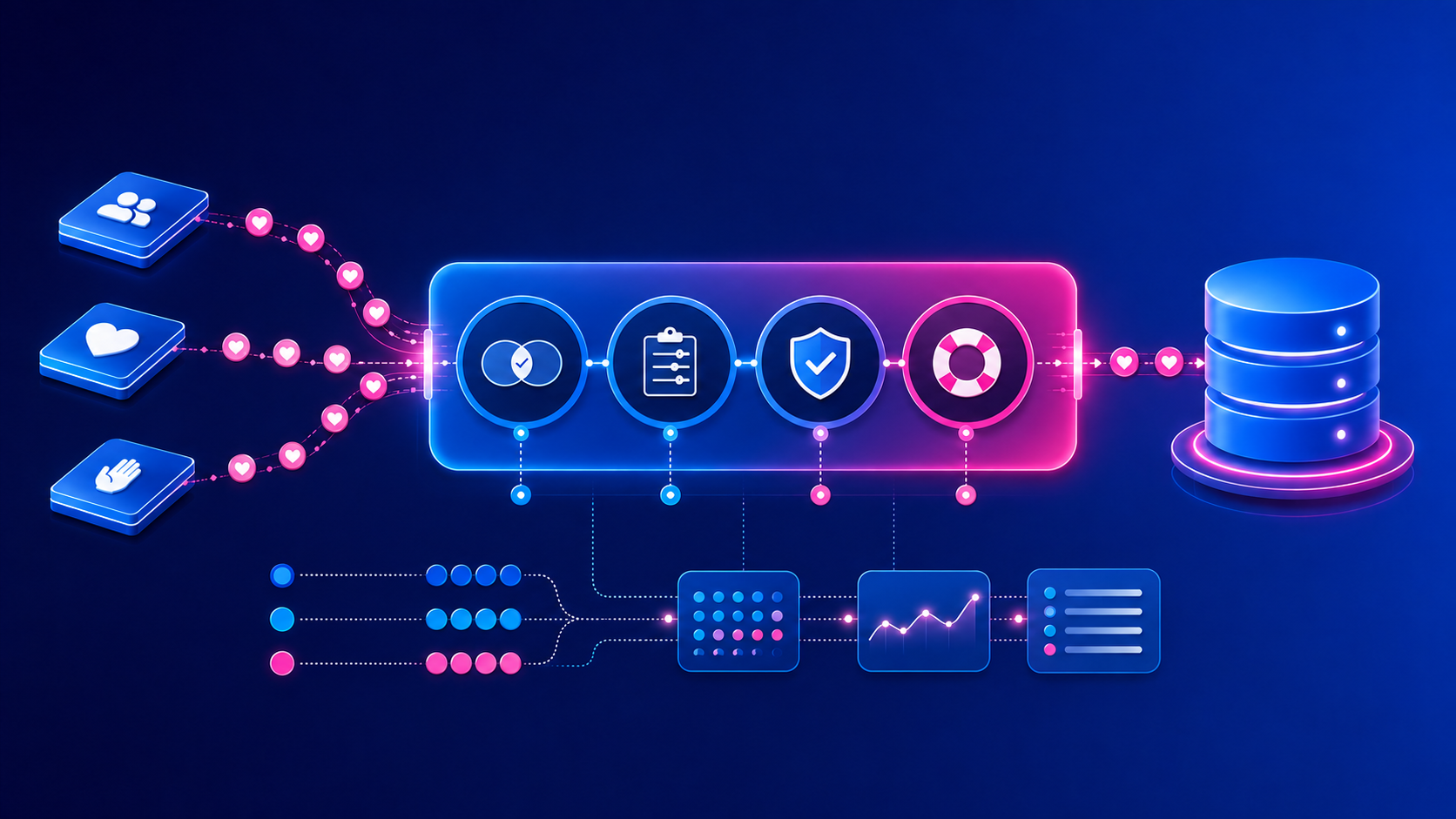
These are the types of processes that Charity Automator Data Flow supports. It automates predictable steps such as collecting transactions, matching constituents, applying approved coding rules, and moving valid records into the CRM while separating exceptions for review.
If a process involves too many decision points, manual checks, or conditional steps, it may be too complex to automate as a whole. But that does not mean it cannot be simplified.
Start by identifying the core tasks that follow a clear, consistent path. Automate those first. Then split off the more complex scenarios for manual handling.
This approach helps you build reliable automation without introducing risk or slowing down your team.
Many nonprofits rely on multiple platforms: donation tools, CRMs, marketing software. When data does not move smoothly between them, teams often step in to fill the gap manually. If you find yourself constantly exporting and importing data between systems, that is a strong case for automating your data flows.
The technology landscape remains fragmented across the nonprofit sector. According to Blackbaud’s 2026 Status of Canadian Fundraising report, only 7% of surveyed organizations describe their technology stack as fully integrated. Most use multiple systems throughout the day or week, and integration is the technology improvement organizations want most.
The report recommends reviewing current systems, workflows, staff capabilities, and the points where data flows are disconnected or fail to meet organizational needs. This assessment helps teams see where manual work has become the bridge between systems.
When fundraising platforms and CRMs are disconnected, staff must export files, clean spreadsheets, match records, apply codes, import transactions, and investigate discrepancies. Automating the reliable movement of data between these systems can reduce delays, improve consistency, and give teams more confidence that they are working with current information.
This approach produces measurable results at scale. Roswell Park Alliance Foundation used Charity Automator Data Flow to automate nearly 17,000 gifts, eliminate hundreds of manual gift entries, and recover approximately 30 staff hours per month. Read the Case Study.
Consider how an online gift moves from a fundraising platform into the CRM.
The automated workflow handles predictable transactions according to the organization’s approved requirements. Staff remain involved where their knowledge, approval, or judgment is needed.
Maybe your reports are always behind. Maybe your team is burned out from repetitive tasks. Maybe you are spending more time cleaning up data than acting on it.
If your operations are starting to feel like a bottleneck, it is time to explore automation. Not as a luxury, but as a necessary step toward scaling your mission. Automation helps you move beyond just keeping up. It gives your team the space to focus on strategy, relationships, and innovation.
This challenge is especially visible in complex fundraising environments where teams process data from events, online giving platforms, finance systems, and multiple campaigns. See how hospital foundations can eliminate manual donor data workflows while maintaining control over matching, coding, exceptions, and reconciliation.
Manual work has a cost even when it is absorbed by an existing team. Use this simple calculation to estimate how much staff capacity a repetitive workflow requires.
Annual manual-work cost = records processed each month × minutes per record ÷ 60 × hourly staff cost × 12
For example, if your team processes 1,000 records per month, spends three minutes on each record, and the work costs approximately $35 per hour:
1,000 × 3 ÷ 60 × $35 × 12 = $21,000 per year
You should also include the time spent correcting errors, investigating missing transactions, resolving duplicates, rerunning imports, and reconciling information across systems.
For a more realistic estimate, add the monthly time spent investigating errors, reviewing exceptions, correcting records, rerunning imports, and reconciling systems.
Fundraising workflow automation also affects what supporters experience after they donate, register for an event, or update their information.
When data moves quickly and accurately between systems, acknowledgements can be sent sooner, communication preferences are more likely to remain current, and fundraising teams have better information for segmentation and personalized outreach.
Automation can also reduce duplicate records and inconsistent campaign data that lead to repeated messages, incorrect recognition, or communications that do not reflect a supporter’s recent activity.
Human oversight remains important. Personal messages, complaints, unusual donor instructions, sensitive information, and significant gifts should be routed to the appropriate staff member. Automation supports the donor relationship by keeping routine operational work moving and giving staff more capacity for the conversations that require care and judgment.
You do not need to automate every fundraising process at once. Begin with one workflow that is frequent, time-consuming, clearly documented, and easy to monitor.
Map how information enters the process, which rules are applied, where exceptions occur, and what the final result should be. Estimate the amount of manual time the workflow requires and identify the delays or errors it creates. This gives your team a practical basis for deciding whether automation is worthwhile.
Start with predictable work and keep people involved in decisions that require context, empathy, or judgment. As the workflow becomes reliable, you can use what you have learned to evaluate the next process.
For nonprofit fundraising teams, successful automation creates clearer processes, more reliable data, and greater confidence that the right information is reaching the right system at the right time.
Charity Automator Data Flow provides a controlled automation layer between your fundraising platforms and CRM. It collects incoming transactions, matches constituent records, applies your organization’s approved coding rules, and moves valid transactions into the CRM on an agreed schedule.
Transactions requiring attention are separated for review, while processing history and source information support monitoring and reconciliation.
Nonprofit workflow automation uses technology and predefined rules to complete repetitive tasks, move data between systems, and route exceptions for review. In fundraising, it can support gift processing, constituent matching, campaign coding, reconciliation, reporting, event registrations, and acknowledgements.
A nonprofit should consider automation when a workflow happens frequently, handles a high volume of records, follows documented rules, and includes predictable exceptions. Automation is especially valuable when manual processing delays gift entry, donor acknowledgements, campaign execution, reconciliation, or reporting.
Common examples include collecting online gifts, importing event registrations, matching constituents, applying campaign and revenue codes, updating CRM records, refreshing recurring reports, supporting reconciliation, and triggering standard acknowledgements. Sensitive, incomplete, or unusual transactions should be routed for human review.
Processes involving ambiguous constituent matches, unusual gift restrictions, sensitive donor messages, complaints, refunds, significant gifts, or unexplained reconciliation differences usually require human review. The purpose of automation is to separate predictable work from situations where context and judgment are important.
Multiply the number of records processed each month by the average minutes spent on each record. Divide the result by 60, multiply it by the hourly staff cost, and then multiply by 12. Include additional time spent correcting errors, resolving duplicates, rerunning imports, and reconciling systems.
Yes. Reliable workflow automation can support faster acknowledgements, more accurate donor records, current communication preferences, and better campaign segmentation. It can also reduce duplicate or poorly timed communications. Staff can then spend more time on personal interactions that require care, context, and relationship-building.
Use our practical checklist to evaluate the volume, repetition, rules, exceptions, risk, and timing of a specific fundraising workflow. It will help your team document the current process, identify strong automation candidates, and determine which situations should continue to receive human review.
6 min read
The Automation Gap in Nonprofits Every day, hospital foundation teams balance urgent donor requests, campaign deadlines, and compliance requirements...
Read More
2 min read
Why this matters for nonprofits Nonprofits must carefully respect donor communication preferences to stay compliant and build trust. Consent in...
6 min read
3 min read
The Roswell Park Alliance Foundation is a not-for-profit organization that manages all donations made to Roswell Park Comprehensive Cancer Center....
2 min read
2 min read
Manual data work is draining your team’s energy. Charity Automator gives it back. Charity Automator is a fully managed solution that helps nonprofit...
3 min read
Automated direct mail gift processing connects returned mail, payment information, campaign coding and supporting documents with the correct...